
Guide
What Is Glass Order Software? A Buyer's Guide for Glass Companies

At a company doing insulated, tempered, laminated glass or glass processing, most of the day goes on the same questions: Where is this order? Is cutting done? Which glass is ready to ship? Has it been invoiced? In this article we explain how glass order software removes these questions and what to look for when choosing the right glass software.
What is glass order software?
Glass order software is a program in which glass companies record quotes and orders with glass-specific sizes and operations, and follow each order from production to shipping and accounting. What sets it apart from generic stock or bookkeeping software is that it speaks the language of glass:
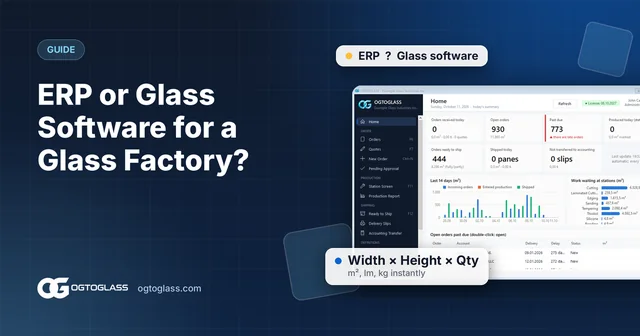
- An order line is entered as width × height × quantity; area (m²), perimeter (linear metres) and weight (kg) are calculated automatically.
- For insulated glass, the spacer, gas (argon) and edge sealant are selected; extra operations are calculated from the size of the glass.
- The order reaches stations such as cutting, edging and tempering according to the product's production route.
- Ready glass is added to a dispatch note, the delivery note is printed and the data is transferred to accounting.
In short, good glass software is not a single screen but an unbroken chain from order to invoice: information entered at one step flows on to the next by itself.
Why paper and Excel are not enough
Many glass companies start out with a notebook or an Excel sheet. That works while orders are few; but as the business grows the same problems keep coming back:
- Orders get lost. Orders arriving by phone, on paper and by message are written down in different places; answering "where is this order?" means asking several people.
- Nobody knows what is happening in production. Which glass is waiting at cutting and which at tempering can only be found out by walking to the shop floor.
- Shipping gets mixed up. Orders ready to ship cannot be told apart from missing panes; trucks are loaded wrongly.
- Everything is retyped into accounting. Shipped glass is entered on invoices by hand, which costs time and invites errors.
- Calculation errors are expensive. A small mistake in m² or linear metres, a forgotten minimum m² rule or a skipped extra operation comes straight out of your profit.
Quick test: When a customer calls and asks "what is the status of my order?", can you answer within 30 seconds? If not, the problem is not your people but your tools.
10 features good glass software should have
The list below is a practical checklist you can use when evaluating glass software.
- Quotes and orders by product type: separate number series for insulated (double / triple), single, laminated and processed glass; turn a quote into an order with one key.
- Fast line entry: typing in Width → Height → Quantity order without taking your hands off the keyboard. This is where the difference shows on orders with hundreds of lines.
- Automatic calculation: m², kg, linear metres and amount calculated instantly; the minimum m² rule applied automatically.
- Customer-specific prices: the customer's agreed price filled in automatically, otherwise the product's standard price.
- Manufacturing sizes and extra operations: plus / minus allowances; quantities for argon, bonding, Georgian bars, holes, sandblasting and similar operations calculated from the glass.
- Production tracking: a route for every product and a station screen; "done" and partial quantity entry.
- Shipping: orders ready to ship in one list, shipping all orders of the same customer on one note, delivery notes.
- Accounting integration: dispatch notes transferred to accounting as delivery notes / invoices.
- Dealer orders: dealers can enter their own orders and you approve them.
- Change history and permissions: who changed what and when; deleted records can be restored; role-based users.
Desktop, own server, cloud: where should your data live?
Glass software can run in different ways. The question to ask when choosing is: where are my orders, prices and customer details stored, and who controls them?
With software running on your own server, the data stays in your company's own database; if the internet connection drops, the office and production keep working. For people who need outside access, such as dealers, only the small page they need can be published to the internet over a secure connection.
Questions to ask when choosing glass software
- Can I see a demo with my own orders?
- Can customer accounts, products and prices be transferred from my old program or Excel? Will numbering continue where I left off?
- How are spacer, gas, edge sealant and extra operations entered for insulated glass?
- Which screen will production staff use? How much training is needed?
- How is data transferred to the accounting software I use?
- What happens if a record is deleted by mistake? Can I see who changed what?
- Can my dealers place orders? Do they need to install anything for that?
Try the OGTOGLASS glass software
Let us answer these questions together, using your own orders.
How does OGTOGLASS meet this list?
OGTOGLASS is Windows desktop glass software made for companies doing insulated, tempered, laminated glass and glass processing. Data is stored in a SQL Server database on the company's own server.
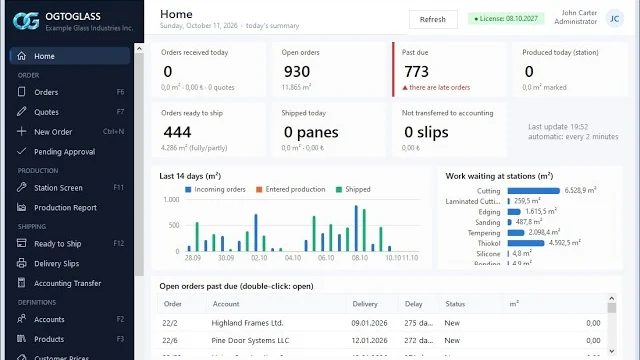
- Order management: number series by product type, fast line entry, customer-specific prices, manufacturing sizes and extra operations.
- Production tracking: routes, station screens, reports by station and day.
- Shipping and delivery notes: ready-to-ship list, one dispatch note, delivery note printing.
- Accounting integration: easy transfer to any accounting software.
- Dealer order link: dealers enter orders from their phones without logging in, and you approve them.
- Change tracking: records are never deleted and every change is kept field by field.
Frequently asked questions
What is the difference between glass order software and general bookkeeping software?
General programs work with quantities and amounts. Glass order software understands glass-specific information such as width, height, quantity, spacer, gas and edge sealant; it calculates m², linear metres and weight itself and carries the order to the production stations and shipping.
Does a small glass workshop need glass software?
Even in a workshop taking a few orders a day, the biggest time wasters are calculation errors and the "where is the order?" question. The more orders you take, the more time the software saves; switching early keeps your data organised from the start.
Will glass software work with my accounting software?
OGTOGLASS integrates easily with any accounting software: dispatch notes are transferred to accounting as delivery notes / invoices, and transferred records are marked in the program.
Try the OGTOGLASS glass software
We will give you a short demo using your own orders.